Developer Guide
Welcome to the NeuroSync Developer Guide!
Table of Contents
Introduction
NeuroSync is a desktop application designed for psychiatrists to manage patient records and session notes efficiently. This guide provides detailed technical information for developers who want to understand the codebase and contribute to the project.
Purpose
This developer guide aims to:
- Help new developers understand the codebase structure
- Document implementation details of key features
- Provide guidelines for testing and maintenance
- Serve as a reference for future development
How to Use This Guide
- Start with the Setting Up section if you’re new to the project
- Read through the Design section to understand the architecture
- Refer to specific sections in Implementation for detailed feature documentation
- Use the Appendix for reference materials and troubleshooting
Getting Help
If you need assistance:
- Check the Troubleshooting section in the Appendix
- Review existing GitHub issues
- Contact the development team
Setting Up
For detailed setup instructions, please refer to the Getting Started section in our User Guide.
Design
Architecture
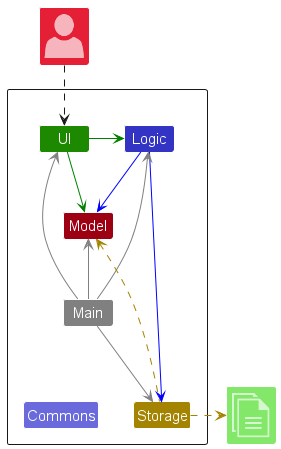
The architecture follows a component-based design with clear separation of concerns. Each component is designed to be modular and maintainable.
Core Components
- Logic: Processes commands and business logic
- Model: Manages data and state
- Storage: Handles data persistence
- UI: Handles user interaction and display
- Common Classes: Shared utilities and helpers
Component Interactions
The sequence diagram below shows how components interact when processing a delete 1 command:
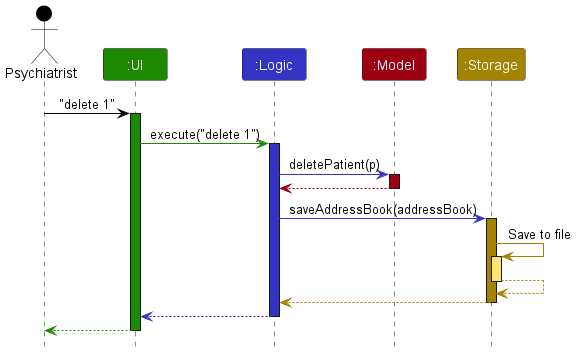
Each component:
- Defines its API in an
interfacewith the same name as the component - Implements functionality using a concrete
{Component Name}Managerclass - Interacts with other components through their interfaces rather than concrete classes
Logic Component
The Logic component handles command processing and business rules.
Command Flow
- User enters command through UI
LogicManagerreceives commandAddressBookParserparses command- Appropriate command class executes
- Results returned through component chain
Key Classes
The Logic component uses a command pattern for handling different operations. Here’s how it works:
-
Command Classes:
Command: Abstract base class for all commands- Specific implementations like:
AddCommand: Adds a new patientDeleteCommand: Removes a patientEditCommand: Modifies patient detailsNoteCommand: Adds/manages patient notesListCommand: Shows all patients
-
Parser Classes:
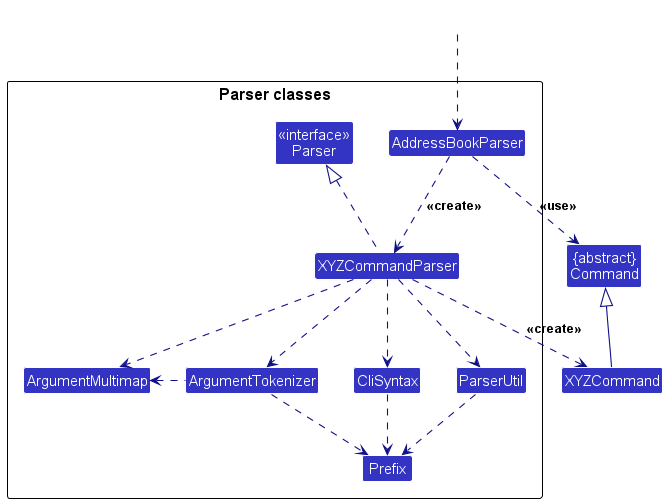
Parser: Interface that all command parsers implement- Specific implementations like:
AddCommandParser: Parses add command argumentsDeleteCommandParser: Parses delete command indexNoteCommandParser: Parses note command arguments
The term “XYZ” in the documentation represents a placeholder for specific command names. For example:
XYZCommandcould beAddCommand,DeleteCommand, etc.XYZCommandParsercould beAddCommandParser,DeleteCommandParser, etc.
Model Component
Model Structure
The Model component manages application data and state.
Key Features
- Stores address book data
- Maintains filtered lists
- Manages user preferences
- Handles patient notes
- Implements undo/redo
Data Structures
UniquePatientList: Core patient storageTreeSet<Note>: Ordered note storageVersionedAddressBook: Undo/redo support
Component API
public interface Model {
    void addPatient(Patient patient);
    void deletePerson(Patient target);
    void updateFilteredPatientList(Predicate<Patient> predicate);
    void commitAddressBook();
}
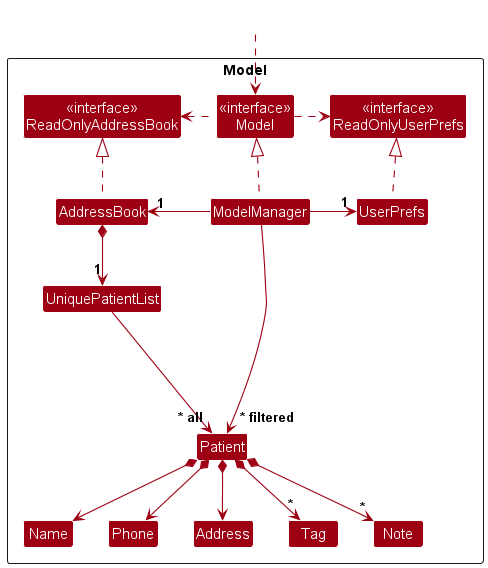
The Model component maintains:
- Patient data in
UniquePatientList - User preferences in
UserPrefs - Filtered patient views
- Note management system
Storage Component
The Storage component handles data persistence.
Features
- JSON-based storage
- Automatic saving
- Data validation
- Backup support
Key Classes
Storage: Main component interfaceJsonAddressBookStorage: Address book storageJsonUserPrefsStorage: User preferences storageJsonAdaptedPatient: JSON serialization
Component API
public interface Storage {
    Path getAddressBookFilePath();
    Optional<ReadOnlyAddressBook> readAddressBook();
    void saveAddressBook(ReadOnlyAddressBook addressBook);
}
Storage Integration
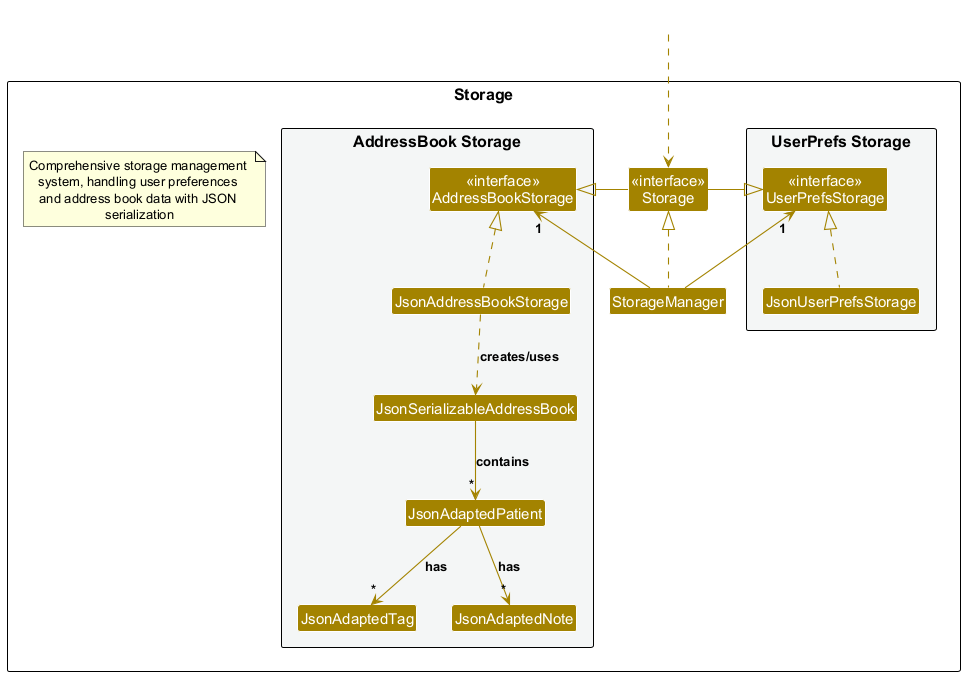
The Storage component provides JSON-based persistence with:
JsonAddressBookStorage: Handles patient dataJsonUserPrefsStorage: Manages user preferencesJsonAdaptedPatient: Converts between JSON and Patient objects
UI Component
The UI component manages all user-facing elements of the application.
Key Classes
MainWindow: The root UI containerCommandBox: Handles command inputResultDisplay: Shows command resultsPatientListPanel: Displays patient listNotesDisplayPanel: Shows patient notesStatusBarFooter: Displays status information
Implementation
The UI:
- Uses JavaFX framework
- Defines layouts in
.fxmlfiles undersrc/main/resources/view - Follows MVVM pattern for data binding
- Implements responsive design principles
- Uses custom styling defined in
styles.css
Component API
public interface Ui {
    /** Starts the UI (and the App). */
    void start(Stage primaryStage);

    /** Returns the primary stage. */
    Stage getPrimaryStage();
}
Common Classes
Classes used across multiple components:
LogsCenter: Centralized loggingConfig: Application configurationStringUtil: String manipulation utilitiesCollectionUtil: Collection helpers
Implementation
This section describes the implementation details of key features in NeuroSync.
Patient Management
The patient management system is the core functionality of NeuroSync.
Features
- Adding new patients
- Editing patient information
- Deleting patients
- Viewing patient details
- Search and filter capabilities
Implementation Details
public class Patient {
    private final Name name;
    private final Phone phone;
    private final Address address;
    private final Set<Tag> tags;
    private final TreeSet<Note> notes;
    // ...
}
The Patient class is immutable, ensuring thread safety and preventing accidental modifications.
Notable Design Considerations
Aspect: Patient Data Storage
- Alternative 1 (current choice): Store all patient data in memory
- Pros: Fast access and modifications
- Cons: Limited by available memory
- Alternative 2: Store patient data in database
- Pros: Can handle large datasets
- Cons: More complex setup, slower access
Notes Feature
The notes system allows psychiatrists to maintain detailed records of patient sessions.
Command Flow: Add Note
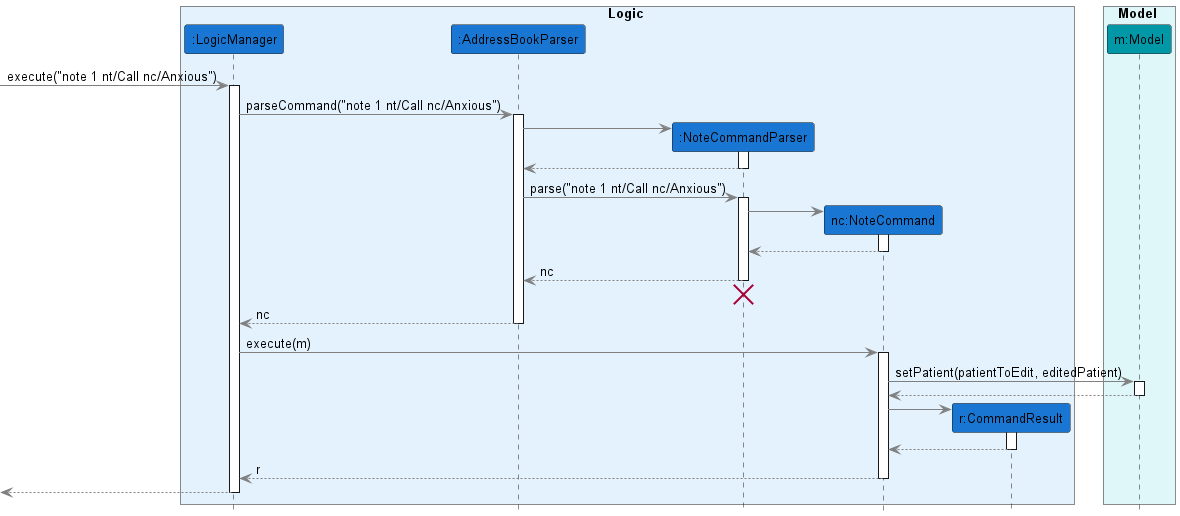
- User enters:
note 1 nt/Session 1 nc/Patient anxious LogicManagerreceives commandAddressBookParsercreatesNoteCommandParser- Parser validates and creates
NoteCommand - Command executes and updates model
Command Flow: View Notes
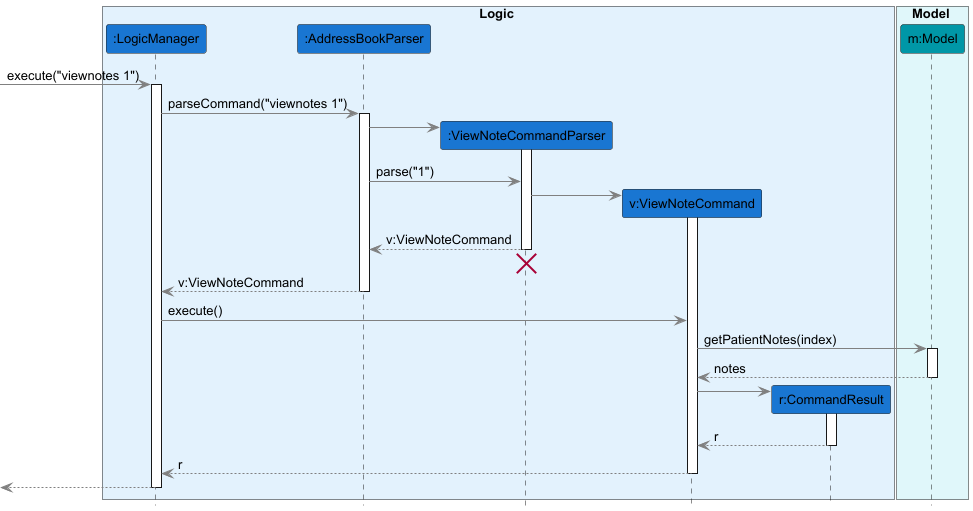
- User enters
viewnotes 1command - Command parsed and validated
- Patient retrieved from model
- Notes fetched and sorted
- Results displayed to user
Implementation Details
public class Note implements Comparable<Note> {
    private final String title;
    private final String content;
    private final LocalDateTime createdAt;

    @Override
    public int compareTo(Note other) {
        return createdAt.compareTo(other.createdAt);
    }
}
Notes are automatically sorted by creation date using a TreeSet.
Notable Design Considerations
Aspect: Note Storage Structure
- Alternative 1 (current choice): Store notes within Patient object
- Pros: Direct access, simpler implementation
- Cons: Larger memory footprint
- Alternative 2: Store notes separately with references
- Pros: Memory efficient
- Cons: More complex querying
Undo/Redo Feature
The undo/redo mechanism allows users to reverse or reapply changes. This feature is implemented using command pattern and state management.
State Management Implementation
The undo/redo feature uses state management to track changes in the address book. Below are the different states and transitions:
Initial State
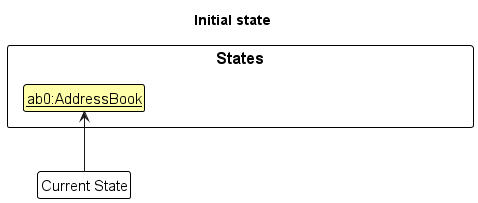
- When the app launches, it starts with a single address book state
- Current state pointer points to the initial state
After delete 5 Command
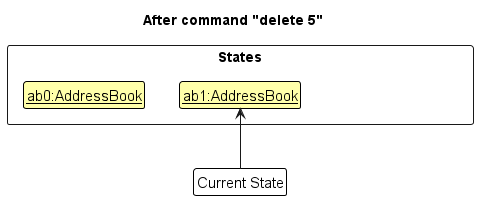
- A new
AddressBookstate is created - Current state pointer is moved to the new state
- Previous state is preserved for potential undo
After add n/David p/88888888 a/NUS Command
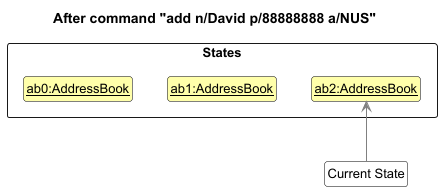
- Another new
AddressBookstate is created - Current state pointer moves to this new state
- All previous states are preserved in sequence
After undo Command
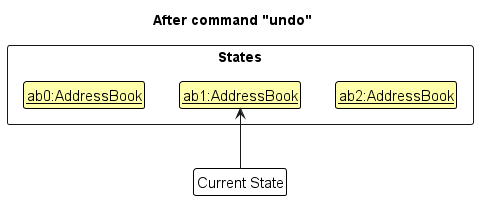
- Current state pointer moves back to previous state
- State is restored to before
add n/David p/88888888 a/NUSwas executed - Most recent state is preserved for potential redo
After list Command
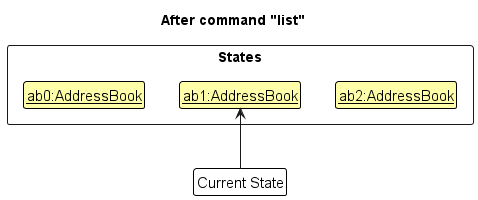
- List command does not modify address book state
- Current state pointer remains unchanged
- No new state is created
After clear Command
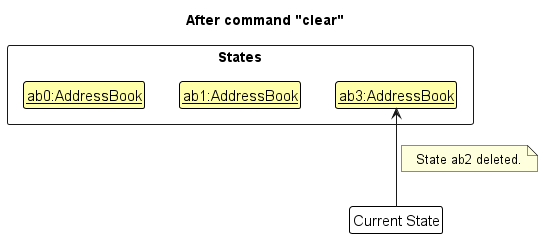
- New state is created with empty address book
- Current state pointer moves to new state
- All previous states are preserved for potential undo
Implementation Details
The feature is implemented using the VersionedAddressBook class:
public class VersionedAddressBook extends AddressBook {
    private final LinkedList<ReadOnlyAddressBook> list = new LinkedList<>();
    private int pointer = -1;

    public void saveState(ReadOnlyAddressBook state) {
        // Save current state
    }

    public ReadOnlyAddressBook getOldState() throws UndoException {
        // Restore previous state
    }

    public ReadOnlyAddressBook getFutureState() throws RedoException {
        // Restore next state
    }
}
Command Processing Flow
The sequence diagrams below illustrate how undo/redo commands are processed:
Logic Component Handling
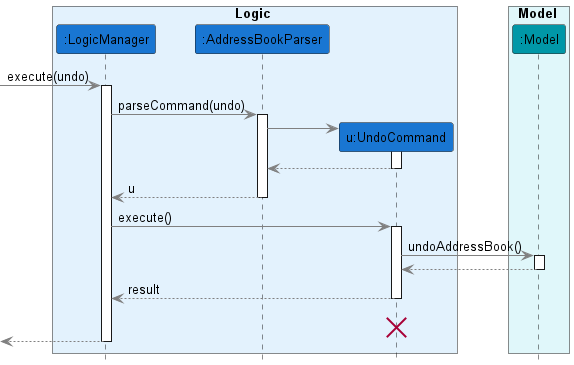
- Shows how the Logic component processes the undo command
- Demonstrates interaction between command classes and model
Model Component Handling
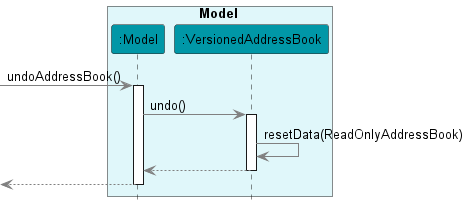
- Shows how the Model component handles state changes
- Illustrates state pointer management during undo operations
Design Considerations
Aspect: State Storage Method
- Alternative 1 (current choice): Store full states
- Pros: Simple implementation, reliable
- Cons: Higher memory usage
- Alternative 2: Store command history
- Pros: Memory efficient
- Cons: Complex implementation, potential bugs
Documentation
Documentation is crucial for maintaining and extending NeuroSync. We maintain two key documents:
- Developer Guide (this document): Technical documentation for developers
- User Guide: End-user documentation
Documentation Maintenance
- Keep documentation synchronized with code changes
- Update diagrams when architecture changes
- Include code examples for key features
- Maintain clear formatting and structure
Diagrams
The following UML diagrams illustrate NeuroSync’s architecture and components:
-
Architecture Overview:
- Architecture Diagram - High-level system architecture
- Architecture Sequence Diagram - Component interactions
-
Component Details:
- UI Class Diagram - UI component structure and relationships
- Model Class Diagram - Model component classes and associations
- Storage Class Diagram - Storage component organization
-
Feature Implementations:
- Add Note Sequence Diagram - Note creation process flow
Each diagram is accompanied by detailed explanations in their respective sections.
Appendix
Testing
This section describes how to run tests and write new tests for NeuroSync.
Running Tests
To run all tests:
./gradlew test
To run specific test classes:
./gradlew test --tests "seedu.address.logic.commands.AddCommandTest"
Writing Tests
When writing new tests:
- Create a new test class in the
src/test/javadirectory - Annotate test methods with
@Test - Follow the naming convention:
{MethodName}_{TestScenario}_expectedBehavior
Example:delete_validIndex_success()
Test Coverage
To check test coverage:
./gradlew jacocoTestReport
The coverage report will be generated in build/reports/jacoco/test/html/index.html
Instructions for Manual Testing
Given below are instructions to test the app manually.
Note: These instructions only provide a starting point for testers to work on; testers are expected to do more exploratory testing.
Launch and Shutdown
Initial Launch
- Download the jar file and copy into an empty folder
- Double-click the jar file
Expected outcome: GUI appears and shows a set of sample patients.
Saving Window Preferences
- Resize the window to an optimum size
- Move the window to a different location
- Close the window
- Re-launch the app by double-clicking the jar file
Expected outcome: The most recent window size and location is retained.
Patient Management
Prerequisites for all patient management commands:
- Use the
listcommand to see all patients and their indices before executing any command - For editing or deleting patients, at least one patient must exist in the list
- For commands requiring a specific patient index, the index must be valid (positive integer within list range)
Adding a Patient
Test case: add n/John Doe p/98765432 a/311, Clementi Ave 2, #02-25 t/Schizophrenia t/Anxiety
Expected outcome:
New patient added: John Doe; Phone: 98765432; Address: 311, Clementi Ave 2, #02-25;
Notes: ; Tags: [Schizophrenia][Anxiety]
Test case: add n/John Doe p/123 a/Address (Testing duplicate patient)
Expected outcome: No patient is added.
Expected error message: This patient already exists in the app. Duplicate patient name is not allowed.
Editing a Patient
Test case: edit 1 n/John Smith
Expected outcome:
Edited Patient: John Smith; Phone: 87438807; Address: Blk 30 Geylang Street 29, #06-40;
Notes: ; Tags: [friends]
Test case: edit 999 n/John Smith (Testing invalid index)
Expected outcome: No patient is edited.
Expected error message: Invalid index! Please provide a positive integer within the patient list range!
Deleting a Patient
Test case: delete 1
Expected outcome:
Deleted Patient: John Smith; Phone: 87438807; Address: Blk 30 Geylang Street 29, #06-40;
Notes: ; Tags: [friends]
Test case: delete 999 (Testing invalid index)
Expected outcome: No patient is deleted.
Expected error message: Invalid index! Please provide a positive integer within the patient list range!
Note Management
Prerequisites for all note management commands:
- At least one patient must exist in the list
- For viewing, editing, or deleting notes, the patient must have at least one existing note
- Use the
listcommand to see all patients and their indices - For commands requiring a specific note, the note title must exist for the patient
Adding a Note
Test case: note 1 nt/First Visit nc/Patient shows symptoms of anxiety
Expected outcome:
Added note to Person: Bernice Yu; Phone: 99272758; Address: Blk 30 Lorong 3 Serangoon Gardens, #07-18;
Notes: [First Visit]Patient shows symptoms of anxiety; Tags: [colleagues][friends]
Test case: note 999 nt/First Visit nc/Patient anxious (Testing invalid index)
Expected outcome: No note is added.
Expected error message: Invalid index! Please provide a positive integer within the patient list range!
Test case: note 1 nt/First Visit nc/Patient anxious (Testing duplicate note title)
Expected outcome: No new note is added.
Expected error message: Note with title First Visit already exists!
Viewing Notes
Test case: viewnotes 1
Expected outcome: Notes of patient at index 1 are displayed.
Expected output: Displaying notes for Bernice Yu
Test case: viewnotes 999 (Testing invalid index)
Expected outcome: Error details shown in the status message.
Expected error message:
The patient index provided (999) is invalid.
Please provide a positive number within the range of the patient list.
viewnotes: Views notes for the patient identified by the index number used in the displayed patient list or views notes for all patients.
Parameters: INDEX (must be a positive integer) or 'all'
Example: viewnotes 1 OR viewnotes all
Filtering Notes
Test case: filternote 1 nt/Visit
Expected outcome: Notes of patient at index 1 containing “Visit” in their titles are displayed.
Expected output: Displaying notes. See notes panel below.
Test case: filternote 1 nt/Nonexistent (Filtering non-existent note title)
Expected outcome: Error details shown in the status message.
Expected error message: Note Title does not exist: Nonexistent
Editing a Note
Test case: editnote 1 nt/First Visit nc/Updated assessment: Patient showing improvement
Expected outcome: Note content is updated.
Expected output:
Edited note of Person: Bernice Yu; Phone: 99272758; Address: Blk 30 Lorong 3 Serangoon Gardens, #07-18;
Notes: [First Visit]Updated assessment: Patient showing improvement; Tags: [colleagues][friends]
Test case: editnote 1 nt/Nonexistent nc/Test (Editing non-existent note title)
Expected outcome: Error details shown in the status message.
Expected error message: Note Title does not exist: Nonexistent
Deleting a Note
Test case: deletenote 1 nt/First Visit
Expected outcome: Note is deleted from patient at index 1.
Expected output:
Deleted Note of Patient: Bernice Yu; Phone: 99272758; Address: Blk 30 Lorong 3 Serangoon Gardens, #07-18;
Notes: ; Tags: [colleagues][friends]
Test case: deletenote 1 nt/Nonexistent (Deleting non-existent note title, assuming patient at index 1 has notes)
Expected outcome: Error details shown in the status message.
Expected error message: Note Title does not exist: Nonexistent
Undo/Redo
Undo Command
Prerequisites: Multiple commands executed before executing this command.
Test case: undo
Expected outcome: The most recent command is undone.
Expected output: The previous command has been undone.
Test case: undo (Testing when no more commands to undo)
Expected outcome: Error details shown in the status message.
Expected error message: No command to undo!
Redo Command
Prerequisites: Multiple patients in the list. Multiple undoable commands executed and undone.
Test case: redo
Expected outcome: The most recently undone command is redone.
Expected output: Previously undone command has been recovered!
Test case: redo (Testing when no more commands to redo)
Expected outcome: Error details shown in the status message.
Expected error message: No command to redo!
Glossary
| Term | Definition |
|---|---|
| API | Application Programming Interface - A set of definitions and protocols for building and integrating application software |
| AddressBook | The core data structure that stores all patient information in NeuroSync |
| CLI | Command Line Interface - A text-based interface for interacting with the application |
| Component | A major architectural unit in the application (e.g., UI, Logic, Model, Storage) |
| FXML | XML-based user interface markup language used with JavaFX |
| GUI | Graphical User Interface - The visual interface of the application |
| JavaFX | A software platform for creating desktop applications, used for NeuroSync’s UI |
| JSON | JavaScript Object Notation - A lightweight data format used for data storage |
| MVVM | Model-View-ViewModel - The architectural pattern used in the UI component |
| Parser | A component that converts user input text into command objects |
| Patient | An individual seeking psychiatric treatment, the main entity in the system |
| State | The condition of the system at a specific point in time (used in undo/redo) |
| UI | User Interface - All components that handle user interaction |
| UML | Unified Modeling Language - Standardized modeling language used in software engineering |
| Undo/Redo | Feature that allows reverting or reapplying previous commands |
| VersionedAddressBook | Extended AddressBook that supports undo/redo operations |
Technical Terms
| Term | Definition |
|---|---|
| Exception | An error that occurs during program execution |
| Gradle | Build automation tool used for building and testing the project |
| Interface | A contract that specifies what methods a class must implement |
| JUnit | Testing framework used for unit testing |
Domain-Specific Terms
| Term | Definition |
|---|---|
| Note | A record of a patient session, including observations and treatment plans |
| Session | A meeting between psychiatrist and patient |
| Treatment | Medical care provided to a patient |
| Diagnosis | Identification of a mental health condition |
| Prescription | Medical treatment ordered for a patient |
| Follow-up | Subsequent appointment to monitor patient progress |
User Stories
As a psychiatrist, I can view all the patients’ information including name, phone number,address so that it is easier for me to have a quick view of all the patients I have.
As a psychiatrist, I can easily add new patients to the app, so that I can maintain an organized record of my patients.
As a psychiatrist having many patients, I can easily search for a patient in the list by inputting any user information (name, phone, address), so that I can get their details or view their meeting notes.
As a psychiatrist in a consultation session with a patient, I can take note of information about this session, so that I can refer to it during the patient’s next visit.
As a psychiatrist preparing for my next consultation session, I can view all the notes of the upcoming patient, so that I can recall any important information about this patient.
Use Cases
System: NeuroSync
Use case: UC1 - Add Patient
Actor: Psychiatrist
Main Success Scenario (MSS):
- Psychiatrist adds patient and enters patient’s details (name, phone number, address, tags).
- NeuroSync saves the patient and his/her details.
Use case ends.
Extensions:
1a. Psychiatrist leaves a required field blank or enters invalid data.
1a1. NeuroSync displays an error message.
1a2. Psychiatrist corrects the data.
Steps 1a1–1a2 are repeated until data are valid and not empty.
Use case resumes from step 2.
2a. NeuroSync detects a duplicate patient record.
2a1. NeuroSync displays an error message saying that the user already exists.
Use case ends.
System: NeuroSync
Use case: UC2 - Find Patient
Actor: Psychiatrist
Main Success Scenario (MSS):
- Psychiatrist searches for patient based on his/her name.
- NeuroSync displays a list of matching patients.
Use case ends.
Extensions:
1a. Psychiatrist enters invalid input (e.g., unsupported characters or incomplete query).
1a1. NeuroSync displays an error message showing the error.
1a2. Psychiatrist corrects the input.
Use case resumes from step 2.
2a. No patients match the search criteria.
2a1. NeuroSync displays a message saying no patients are found.
Use case ends.
System: NeuroSync
Use case: UC3 - Add Notes to Patient
Actor: Psychiatrist
Main Success Scenario (MSS):
- Psychiatrist selects a patient from the patient list.
- Psychiatrist adds a new note to the patient, specifying the note title and contents.
- NeuroSync saves the note under the specified patient.
Use case ends.
Extensions:
2a. Psychiatrist leaves the note title or content blank.
2a1. NeuroSync displays an error message indicating that the note title and content cannot be empty.
Use case resumes from step 2.
2b. Note title already exists for the same patient. (Duplicate title detected)
2b1. NeuroSync displays an error message indicating that the note title already exists.
2b2. Psychiatrist edits the note title to a unique one.
Use case resumes from step 3.
System: NeuroSync
Use case: UC4 - View Patient’s Notes
Actor: Psychiatrist
Main Success Scenario (MSS):
- Psychiatrist selects a patient from the patient list.
- Psychiatrist chooses to view notes belonging to the selected patient.
- NeuroSync displays a list of all notes associated with the patient.
Use case ends.
Extensions:
3a. Selected patient has no notes.
3a1. NeuroSync displays a message saying this patient has no notes.
Use case ends.
Appendix: Effort
Difficulty level: Moderate, twice as hard as Individual Project
Challenges faced:
- Reading through and understanding AB3 codes, many layers of abstraction, many unfamiliar models, classes, methods
- Implementing new commands, was difficult finding where to add various chunks of code, many classes from all over the application had to be changed, tests had to be added
- Git workflows, merge conflicts, so many additional steps to make sure things go smoothly
Effort required: High
Achievements of the project:
- Very familiar with git workflows now, comfortable working on team projects iteratively
- Learnt and appreciated the abstractions of code in AB3, even though it looks like a lot of redundant work for such a simple application, it made sure that everything ran smoothly and greatly reduced the potential number of bugs
- Learnt about proper documentation and standard conventions in code and git
Planned Enhancements
- Add feature to preserve the displayed list after commands that change the data e.g,
add,editnote. - We plan to improve the architecture diagrams section, to better illustrate the usage of MVVM in data-binding (as specified in Implementation section)
- Add duplicate detection and warnings for near match cases (e.g, same name with extra whitespace in between)
User Interface Improvements
- Support for more languages, including right-justified languages
- Keyboard shortcuts for common operations
- Support the use of up/down on keyboard to toggle among commands
Security Features
- Adding of NRIC numbers and masking it
- End-to-end encryption for sensitive patient data
- Audit logging for all data modifications
Patient Management
- Support for patients with duplicate names - We plan to use name and phone number together as unique identifiers.
- Appointment scheduling
- Prescription management system
- Extend tags to accept symbols
- Emergency contact as a new field for patient information
Appendix: Requirements
System Requirements:
- Java: Version 17
- Compatibility: Windows, macOS, Linux
Non-Functional Requirements
- The application should load the main interface within 10 seconds on standard hardware.
- Searching for a patient should return results in under 1 second for up to 10,000 contacts.
- The response to any use action should become visible within 5 seconds.
- The application should allow the user to add at least 100 patients.
- The user interface should be intuitive enough for users who are not IT-savvy.
Troubleshooting
If you encounter issues, please:
- Check the NeuroSync GitHub issues
- Contact the development team